Can you build a car classifieds website on Osclass?
Yes.
A classifieds script is self-hosted PHP software for listings, categories, users, and search. Vehicle buyers expect more than title and price. They filter by make, model, year, mileage, fuel, and body style. A car marketplace needs structured attributes, a cascading make/model filter (model options depend on the selected make), a shallow multi-type category tree, and search that stays fast as inventory grows.
Osclass 8.x on PHP 7.4+ supplies the listing core. You host it on PHP and MySQL. This guide covers automotive classifieds end to end: vehicle-type categories, structured attributes, make/model search, listing pages, SEO, fees, scaling, and launch checks. Plan categories and fields before bulk import: reparenting categories after launch breaks saved filters and field attachments.
How do I build a car classifieds website? Install Osclass, create the two-level category tree, define make/model fields per vehicle class, seed cars/motorcycles/trucks, then index hubs with real listings before paid traffic.
What features does it need? Vehicle-type categories, managed make/model lists, structured attributes, numeric range search, location filters, and moderation plus optional fees.
How should categories be structured? Two levels only: Level-1 vehicle type, Level-2 body style. No third level. Make, model, fuel, and price stay in attributes.
How should make and model work? Managed lists per vehicle class with cascade search, not free text in titles.
Can Osclass handle cars, motorcycles, and trucks? Yes. Separate Level-1 branches and attribute sets per type; Phase 1 is usually cars, motorcycles, and trucks.
For an automotive classifieds website, use categories for vehicle inventory types and body styles, and attributes for specifications such as make, model, fuel, transmission, mileage, year, and price.
Deep category branches duplicate browse paths, break faceted filters, and overload Osclass category pickers (Lessons Learned).
Vehicle marketplaces break when make, model, and year sit in free-text titles. Buyers cannot filter consistently, saved-search alerts miss matches, and SEO URLs multiply without inventory. Automotive listings need structured identity (make, model, year), specifications (mileage, fuel, transmission), and commercial data (price, condition, seller type) stored as filterable values.
Generic classifieds treat every ad as title + description + price. That works for furniture or tools. A vehicle listing is closer to a fixed identity: Audi A4, 2021, diesel, automatic. Buyers expect to search that way, not to parse free text in the description.
A live vehicle board needs six things beyond basic publish: vehicle-type categories, make/model lists per type, structured attributes with fixed option values, search with numeric ranges, location filters, and moderation plus optional fees. Skip one and you get empty filters, duplicate ads, or thin SEO pages.
In a typical Osclass automotive setup, operators compete against dealer DMS tools, dealer website builders, and generic marketplace scripts. Osclass fits the self-hosted classifieds layer: public listings buyers can search. It does not replace showroom CRM or floorplan systems (see the DMS comparison section below).
Before go-live: name one person who owns category changes, one who owns attribute/property lists, and one who owns moderation. Vehicle boards fail quietly when taxonomy edits happen without a staging pass.
Osclass is free open-source PHP classifieds software (~7 MB core). It ships listings, categories, users, custom fields, search, moderation, alerts, friendly URLs, and multilingual support without a WordPress or framework host. You host it yourself and own the database.
Core custom fields cover basic vehicle facts. A multi-type board usually outgrows them once make/model must cascade and filter URLs must stay readable. Many sites add an attributes plugin on top of core categories. Osclass has no hard category row limit, but full-tree select boxes on publish and search screens stay responsive around 400-600 categories unless you customize lazy or AJAX pickers (see Lessons Learned).
Review core features, try the live demo, then download from the Osclass site.
Recommended search box on automotive classifieds: vehicle-type tabs (cars, motorcycles, trucks), then cascading Make and Model fields, body type, year and mileage ranges, and a clear Search action. Buyers should reach filters without scrolling past unrelated categories.
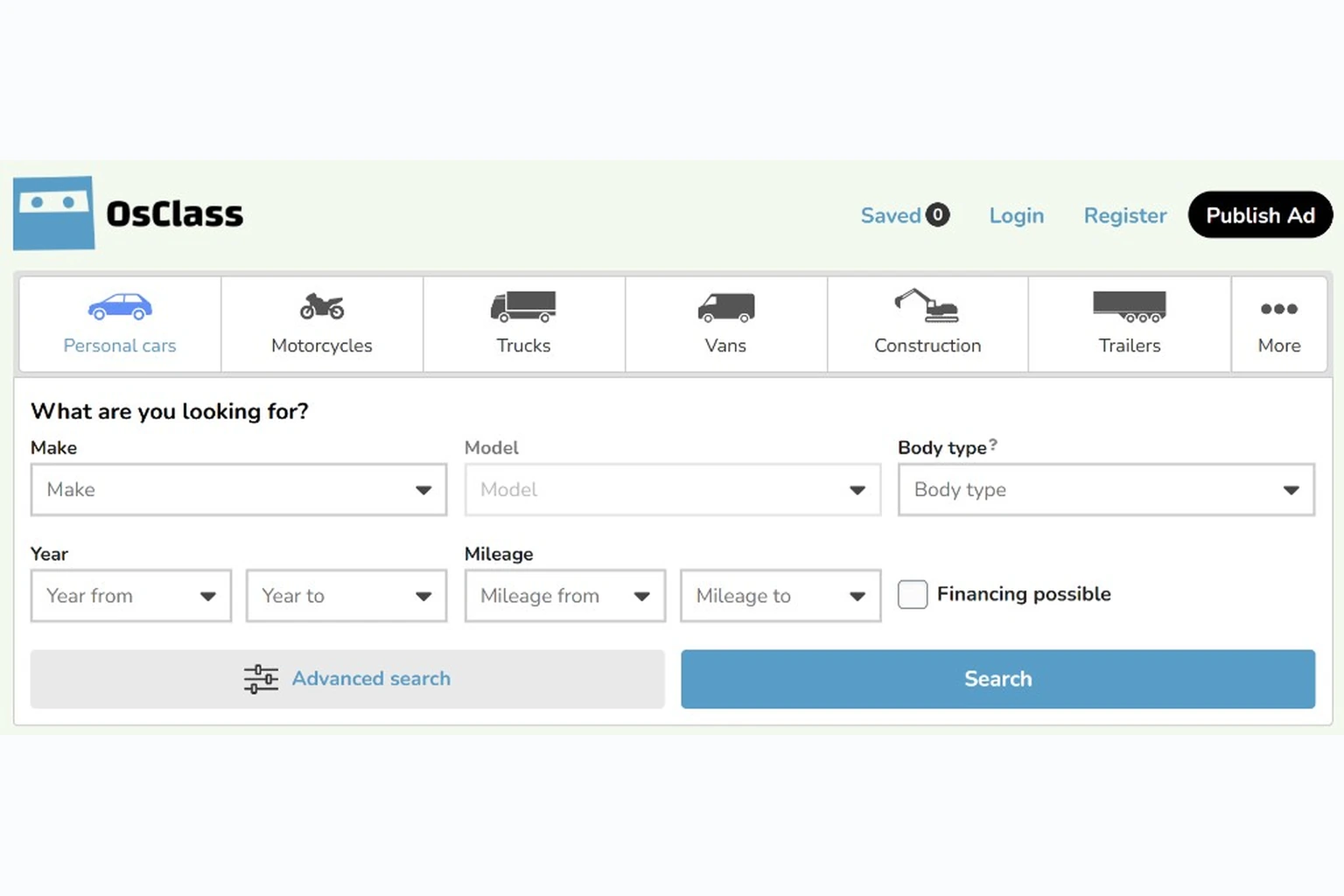
Use one Level-1 category per vehicle type and Level-2 body-style categories inside each type. Keep the tree two levels deep. Major automotive marketplaces browse by vehicle type first, then body style, then filter by make, model, year, mileage, fuel, and transmission. Shallow depth does not mean a single vertical: breadth across vehicle types matches how buyers shop.
Category tree (Level 1 / Level 2): one card per vehicle type; each line under the header is a body-style subcategory to create in oc-admin.
No third level. That covers multi-vehicle browse paths without overloading Osclass category pickers.
Osclass category count: practical limits
Osclass loads the category tree into select boxes on publish forms, search widgets, and parts of oc-admin (front office and back office). Up to a few hundred categories is usually fine. Between roughly 400-600 and 2,000 it still works but needs monitoring. Past 2,000-3,000, HTML payload and browser rendering on those screens gets noticeably slow even when MySQL accepts the rows. If you need a deep tree for a genuine business reason, budget custom work: load Level-1 first, fetch children via AJAX when the parent is chosen, and never inject the full tree into one dropdown on first paint.
Dependent lists; one make/model dataset per vehicle class
Same body styles can use any fuel or transmission
Commercial filters, not inventory classes
Fuel attribute, not Cars > Electric as a category branch
Specification or equipment attribute
Osclass country / region / city hierarchy
Launch priority. Phase 1: Cars, Motorcycles & Scooters, Trucks & Commercial Vehicles. Phase 2: Vans, Motorhomes, Trailers, ATVs, Classic & Vintage when inventory justifies them. Parts & Accessories and Automotive Services are adjacent inventory: add only if the marketplace hosts non-vehicle listings. The same category-to-attribute-set pattern extends to construction or agricultural equipment if you add those verticals later.
Import or clone this tree in oc-admin before you seed listings. Freeze the Level-1 names early: renaming a vehicle-type category after launch breaks bookmarks, saved searches, and attribute set bindings tied to category IDs. Document the final tree in a spreadsheet so moderators and importers use the same category labels.
Filterable values must be structured attributes with predefined option lists, not free text. A seller typing “Audi A4” in the title breaks make/model filters, saved alerts, and slug-based SEO URLs. Group fields into identity, specifications, commercial data, and optional detail blocks.
Cars: recommended field groups
Default publish form per type: Make, Model, Year, Price, Condition, Location, two or three type-specific fields, and photos. Expose the rest as optional attribute groups sellers can expand. Required fields belong on the default form; equipment packs, ADAS, and interior detail stay optional so mobile publish completion stays high.
Property count warning: a niche vertical (army surplus off-road rigs, agricultural specials) may need dozens of extra fields. That is fine for the form, but hundreds of active properties per category multiply database rows when each property stores as its own line per listing. Cap searchable properties to what buyers filter on; keep the rest display-only or grouped in optional sections.
Fields for motorcycles, trucks, trailers, and motorhomes
Osclass categories answer “what kind of vehicle is this?” Attributes answer “which make, model, year, and specs?” Core custom fields work for a single vertical with a short field list. Most multi-type automotive boards add an attributes plugin (or custom meta) so each vehicle class gets its own make/model lists, grouped spec sections, and searchable ranges.
Plan two layers before import: Level-1 categories for browse paths, and one attribute set per vehicle class so publish forms and search widgets load the right fields. Cars, motorcycles, and trucks should not share one make/model dropdown.
Category to attribute set mapping
| Osclass category (L1) | Attribute set | Make/model data | Implementation note |
|---|---|---|---|
| Cars | Car | Large default make/model list | Start here; most fields and traffic |
| Motorcycles & Scooters | Motorcycle | Separate from car makes | Use distinct make identifiers so car and moto models do not merge |
| Trucks & Commercial Vehicles | Truck | Truck-focused dataset | Add GVWR, axle count, cab type as searchable fields |
| Vans & Minibuses | Van (or truck set initially) | Configure manually | Merge into truck set until inventory justifies a split |
| Motorhomes & Caravans | Motorhome | Configure manually | Add berths, chassis base, dimensions |
| Trailers | Trailer | Configure manually | Add axle count, GVWR, hitch type |
| ATVs, UTVs & Powersports | ATV / powersports | Configure manually | Phase 2 vertical |
| Classic & Vintage Vehicles | Reuse car / motorcycle set | Shared with cars or motorcycles | Keep separate browse categories; do not duplicate make/model datasets |
| Parts & Accessories | No vehicle attribute set | N/A | Plain custom fields; part fitment by make/model optional |
| Automotive Services | No vehicle attribute set | N/A | Service fields only; no make/model cascade |
Osclass core vs structured attributes
oc_t_item_meta key/value rowsPlugin option: for prebuilt automotive attribute sets, cascading make/model, and slug filter URLs on Osclass 8.x, see Ultimate Attributes PRO (first release October 2023, 40+ updates through 2026). For a curated theme plus plugin set, use the OsclassPoint vehicle marketplace kit. Small boards can stay on core custom fields until cascade search becomes a blocker.
Buyers should pick predefined filter values the database can index, not guess keywords. Put a structured search widget on the home page, search page, or both: select, checkbox, slider, text, and numeric inputs, with or without a category pre-selected.
Enable Allow Search only on filters buyers use. Too many searchable core custom fields multiply join cost past a few thousand listings.
Filter order: vehicle type (or category), make, model, then price, year, and mileage bands, then fuel and transmission. On mobile, put location last so spec filters stay above the fold. Test zero-result states and one make selected (models from another vehicle class must not appear).
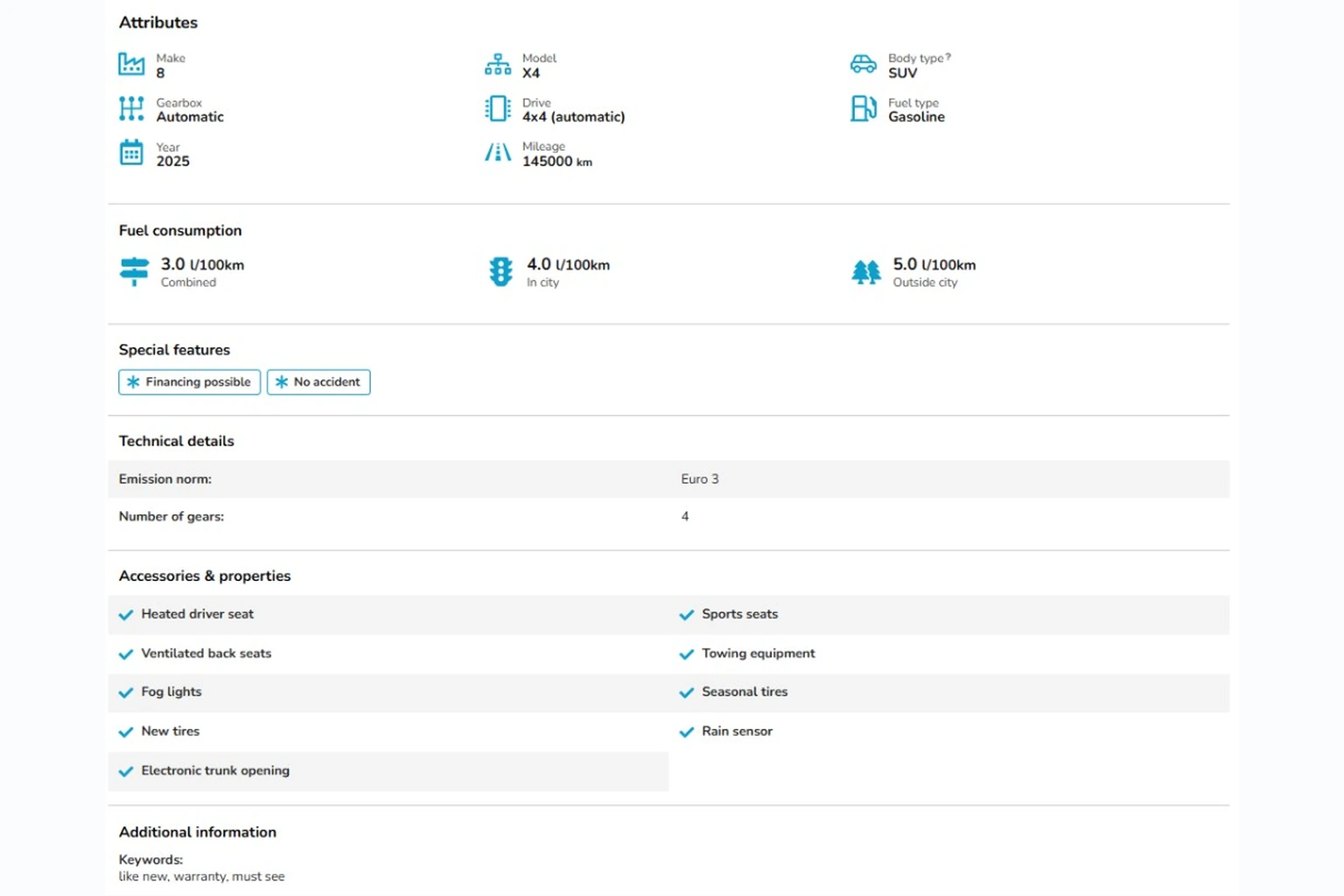
A vehicle detail page should show price, identity, key specs, seller trust, and location on the first mobile screen. Put structured attributes in labeled blocks, not only in the description.
Gallery: 8-20 photos; the first image is the social preview. Above the fold: price, make, model, year, mileage. Spec block: fuel, transmission, body style, color, equipment. Seller row: private or dealer badge, contact path, optional dealer profile. Location: city and map pin when coordinates exist. Below the fold: related listings from the same make/model or category hub.
Repeat key specs in attribute blocks even when they appear in the title. Use the long description for condition notes and seller comments, not for mileage or fuel type.
Example layout: separate sections for core specs (make, model, year, mileage), fuel consumption, badges (financing, accident history), technical rows, and accessory checklists.
Index category and location hubs with real inventory. Noindex thin filter combinations that return fewer than a handful of results. Canonical tags point at the primary hub, not sort or locale duplicates.
Where your stack supports slug-based filter URLs, an Audi A4 hub can look like .../make,audi/model,a4/... rather than opaque numeric IDs. Readable slugs help when you reorder fields in oc-admin or translate labels for multilingual sites.
| Page type | Index? | Automotive example |
|---|---|---|
| Category + city hub | Yes, with listings | Cars > SUVs / Crossovers in a seeded city |
| Make/model filter URL | Yes, with inventory | Audi A4 results with 10+ live ads |
| Thin fuel/trim combo | Noindex | Diesel filter in a city with zero matches for 30 days |
| Sort or locale param | Canonical to hub | Same SUV hub, not duplicate sort URLs |
Crawl patterns: architecture guide. Release notes: changelog.
Vehicle boards monetize through paid listings, featured placement, and dealer subscriptions. Osclass Pay handles platform fees (Featured, Move to Top, Highlight, publish fees, memberships) via gateway plugins. It is not buyer-to-seller checkout for the vehicle purchase price.
Typical rollout: free posting while inventory is thin, then Featured once sellers get replies. Dealer subscriptions fit showrooms that post weekly. Private sellers stay on single-listing fees; bulk dealer portals need custom import (not core). Turn on one fee SKU first; test payment callbacks in sandbox.
Dealers often expect CSV or feed import; that is custom integration, not core Osclass. Price private-seller posting lower or free until the board has traffic, then charge dealers for volume or Featured slots once they see contact rate.
Vehicle sites carry heavy image volume and attribute-heavy queries. How specs are stored (one row per listing vs one row per field) affects filter speed as much as raw listing count. Osclass query cache and session storage help filtered search stay predictable; hosting and cron still matter.
oc-content/uploads.OSC_CACHE when traffic rises.Hosting: cloud vs VPS guide.
A typical Osclass automotive setup on launch day: Osclass 8.x on PHP 7.4+ hosting with SMTP and system cron; one theme with a clear vehicle search header; structured make/model fields aligned to your category tree (core custom fields or an attributes plugin); a country geolocation SQL pack; Require Admin Approval plus captcha; analytics and daily backups before paid traffic.
Add Osclass Pay and a gateway connector only after seed inventory and contact rate exist. Core friendly URLs plus readable attribute filter paths cover most automotive SEO without an extra SEO plugin pack.
Staging checklist before launch: publish one car, one motorcycle, and one truck listing through the full form; run the same three make/model searches on mobile; confirm category pickers load in under two seconds; verify SMTP and cron last-run in oc-admin.
Osclass is classifieds and marketplace software, not a dealer DMS. It does not ship VIN decoding, valuation engines, floorplan tracking, service-department workflows, or native manufacturer inventory feeds. DMS platforms run showroom operations; classifieds software publishes listings buyers can find.
| Option | Best for | Vehicle classifieds fit | Typical gap |
|---|---|---|---|
| Osclass | Self-hosted multi-seller marketplace | Categories, moderation, search, fees via Osclass Pay | No DMS/CRM; no buyer checkout for vehicle price |
| Custom PHP build | Unique workflows, heavy integrations | Full control of storage and filters | You own taxonomy, search, upgrades, payment callbacks |
| Generic marketplace / SaaS | Fast launch, managed hosting | Varies; often weak multi-type make/model | Export, URL control, attribute depth |
| Dealer DMS | Showroom operations, inventory sync | Strong internal inventory | Not a public multi-seller classifieds board |
Osclass fits when: you operate a multi-seller vehicle marketplace, a regional used-car portal, or a dealer group wants a branded listing site on their domain.
Look elsewhere when: you need CRM pipelines, F&I calculators, service booking, or real-time DMS sync as the source of truth.
Many dealers run both: DMS for internal ops, classifieds for public exposure. Stack selection: classifieds software comparison.
These notes come from live Osclass automotive deployments (observed ranges, not benchmarked lab data). That is why the category and attribute limits in this guide are strict.
Case: do not model every vehicle spec as a category
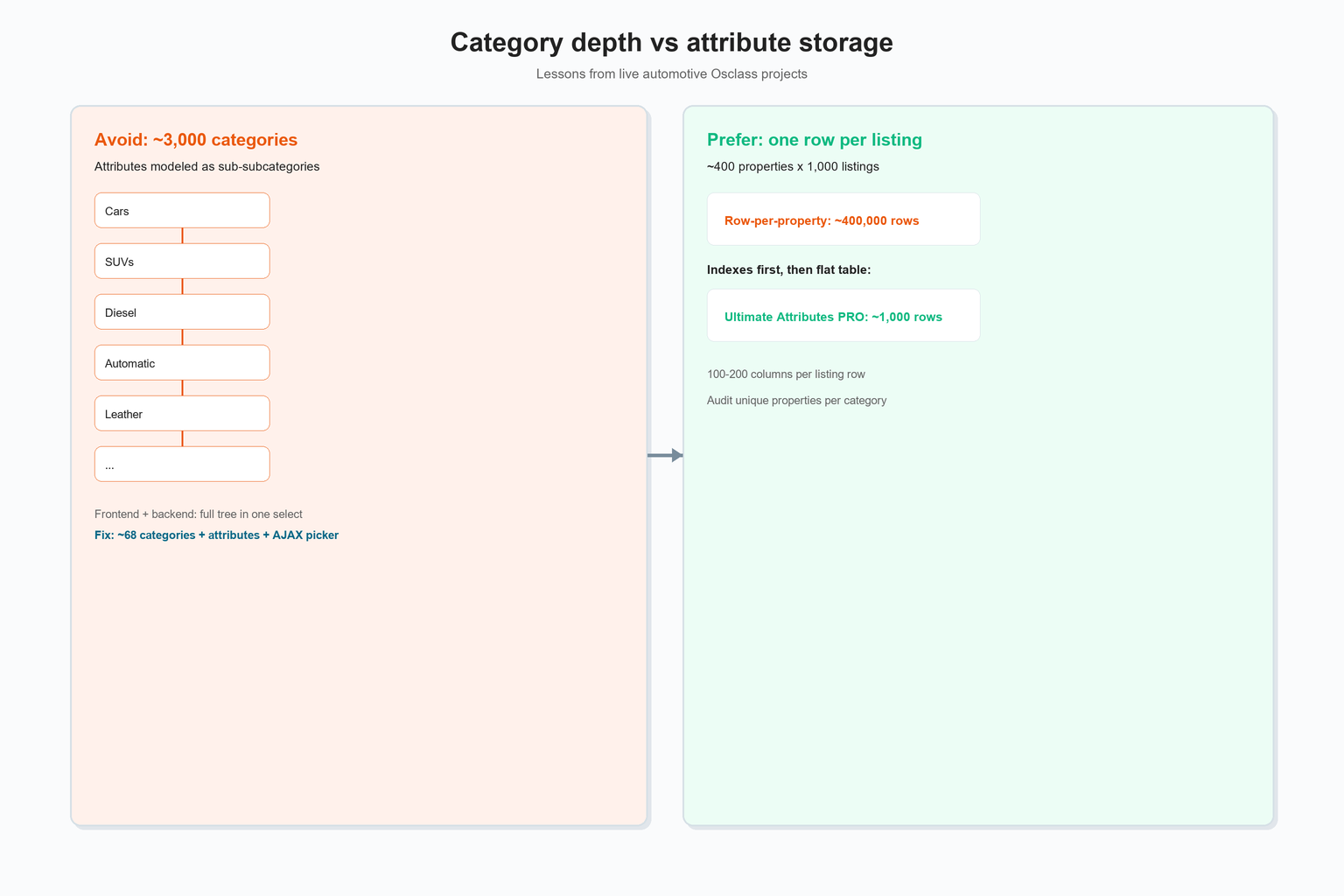
Problem: About three years ago we supported a customer launching a general automotive classifieds site: cars first, plus motorbikes and a few other vehicle types. The customer wanted a very rich category structure. The tree grew past subcategory into sub-subcategory, and individual car attributes (fuel, trim, equipment) were added as deeper category levels. The tree reached between about 3,000 and 4,000 categories.
That broke the publish and search experience before it broke MySQL. Osclass loads the full category list into select boxes in several places on the front office and in oc-admin. Up to roughly 400-600 categories is usually responsive on default pickers. Past that, full-tree dropdowns struggle: HTML payload balloons, the browser struggles to render the dropdown, and page load feels stuck even though the server responds.
What we did: We cut the tree to around 700-800 categories and moved vehicle specs into a multi-language attributes plugin with its own storage table, not the category table. We also changed the front-office category picker: load Level-1 categories first, fetch children only after the parent is selected (AJAX), instead of injecting the entire tree at once.
What changed: Load time and UX recovered immediately.
Recommendation: Use the two-level pattern in this guide (vehicle type, then body style; specifications as attributes) unless you have a hard business case for a deeper tree. If you truly need thousands of categories, reserve extra time to replace or lazy-load category selectors on publish, search, and admin screens.
Case: row-per-property storage vs one row per listing
Problem: A second project targeted a narrow vertical: non-standard off-road and ex-military-style vehicles. The customer needed a long spec list per listing. We attached roughly 300-400 properties per category through a multi-language attributes plugin. The plugin handled the form fine.
The database did not. Each listing wrote one row per property. About one thousand live listings with roughly 400 properties each produced on the order of hundreds of thousands of attribute rows (around 400,000 in that deployment). Filtered search and admin grids slowed down.
What we did: We added extra indexes on the attribute tables first, which helped to an acceptable level, but the row count was still the root problem. That led us to flat-table storage: all property values for one listing in one row (on the order of 100-200 columns, rebuilt when the schema changes).
What changed: The same thousand listings became one thousand attribute rows instead of hundreds of thousands. Query plans for make/model filters got simpler; page load for filtered search improved.
Recommendation: Before you add the 200th custom property, ask whether buyers will ever filter on it. Display-only fields belong in optional sections, not in searchable storage.
The hard part is structuring data so buyers can filter by make, model, and specs across vehicle types. Publishing a listing is straightforward once the taxonomy is set. Lock your category tree, define attribute sets per vehicle class, configure make/model search, seed Phase 1 inventory, then promote once filters return results.
Download Osclass or try the live demo and publish a test vehicle listing end to end.
The lessons above come from live automotive Osclass projects described on this page.

This article was last updated on 15. October 2026.