Teams searching for classifieds software for job listings need structured fields, employer moderation, and expiry that actually removes closed roles. Job boards fail when salary ranges are missing, role types are inconsistent, or expired jobs stay live. Employers leave if posting is confusing or paid visibility does not bring applicants.
Osclass is free open-source classifieds software that can run a niche job board when you set role taxonomy, employer verification, moderation rules, and expiry cron correctly. For the beginner builder path (domain, brand, themes, seed jobs, promotion), see how to build a job board. Pair with niche selection notes before you commit. Keep salary and compliance text accurate for your region.
Create a top-level Jobs category, then nest role groups under it: engineering, design, sales, healthcare, local services. Nested categories can carry different custom field sets, so a nursing role does not show Java-years fields meant for engineers.
Attach fields from Settings > Categories. Prefer select/number for filters; free-text salary breaks facets. For hiring, require the fields candidates actually filter on:
| Field | Osclass field type | Why it matters |
|---|---|---|
| Contract type | Select: full-time, part-time, contract | Facetable; keeps search clean. |
| Salary min / max | Two number fields (Allow Search) | Queryable ranges beat free-text "competitive". |
| Work location mode | Select: on-site, hybrid, remote | Normalized filters; pair with core city/region for place. |
| Seniority | Select | Cuts mismatched applications early. |
| Application deadline | Text (or date-style text) | Display urgency; listing expiry period still closes the post via cron. |
| Apply URL | URL, optional | External ATS or careers page; otherwise use contact email on the listing. |
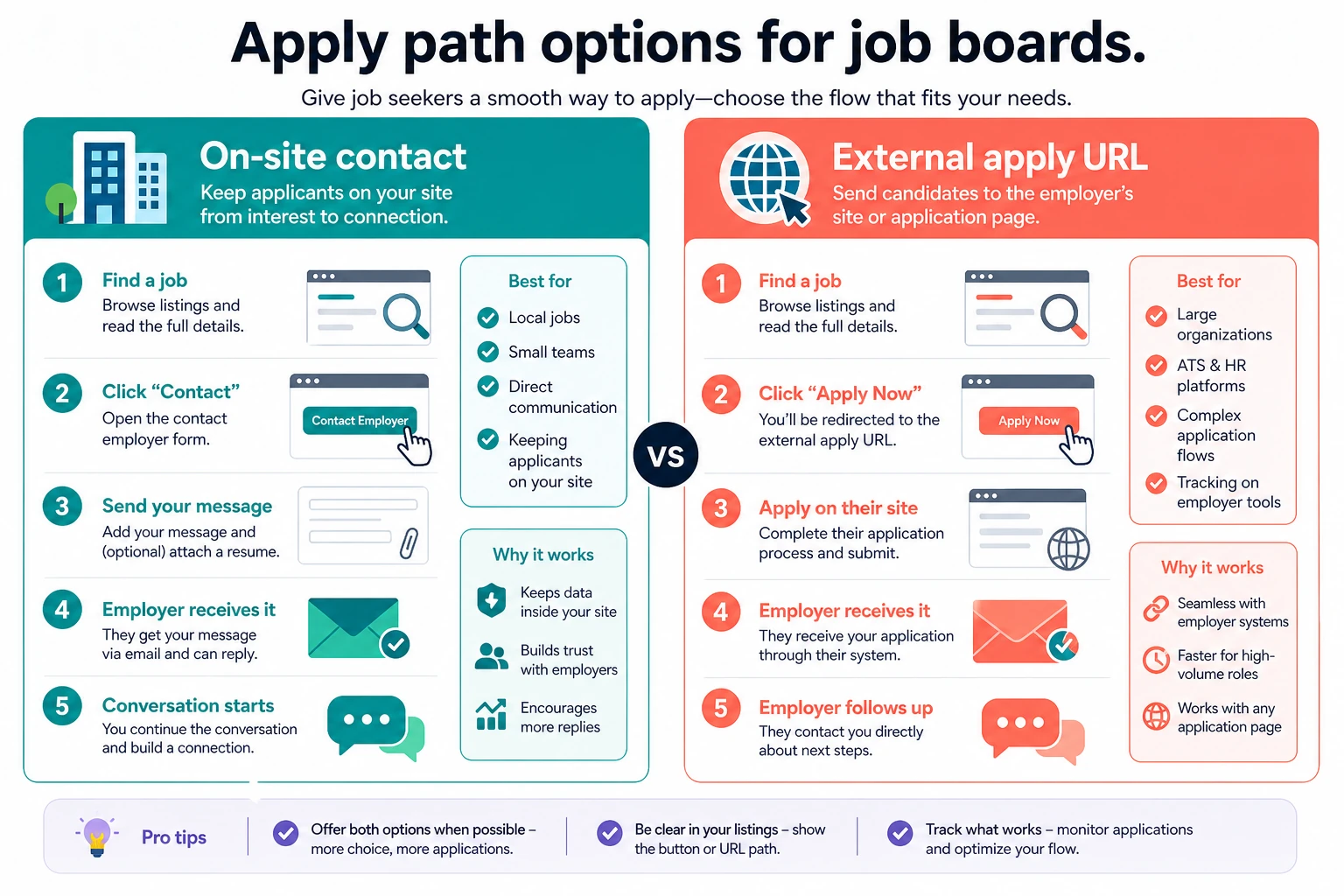
Default apply path for most niche boards: required contact email, optional Apply URL for link-out. Resume or CV upload needs the active theme to print the upload UI (Jobs attributes alone are not enough). On CareerJob-style themes, enable contact-form attachments so CVs reach the employer, and disable ajax search when multi-filter mobile UX breaks. Do not build a full ATS in Osclass unless you own the pipeline product. Keep company name, website, and about on the user account or a profile plugin; do not duplicate that as free-text on every job.

Turn on Require Admin Approval for new employers until the account is trusted. Unverified employers post fake vacancies; require a working contact email and company website before they can buy Featured or other paid placement.
Native Osclass covers publish, categories, custom fields, moderation, and expiry. Paid visibility usually comes from Osclass Pay: start with Featured (Premium) only, then Top of Category or Highlighted after posting volume and callbacks work. Memberships wait until employers already renew.
Staging sequence with a sandbox gateway: create a listing, pay, receive the callback, confirm the promotion applied, wait for expiry or renew, then force a failed callback and reconcile manually in the payment plugin. If the callback URL is blocked or loops on HTTPS, the gateway can succeed while the job stays unpaid.
Set listing expiration (for example 30 days) under listing settings so closed roles leave search when cron runs. Disable Automatic CRON under Settings > General; schedule system crontab (index.php -p cron -t minutely|hourly|daily) with the same PHP binary as the web pool. Saved search alerts for candidates depend on those jobs. Import geolocation packs for countries you hire in so city filters are not free-text noise.
Each live job needs a unique title with role and location when possible. Keep permalinks stable after launch. Canonical tags on job detail pages should beat filter variants for the same posting.
Do not index empty filter combinations. City + role + seniority URLs with zero or one listing dilute crawl budget; prefer noindex or canonicalize to the role category. Theme markup should emit JobPosting structured data where possible (title, datePosted, validThrough, hiringOrganization, jobLocation); validate with a rich-results test after theme changes.
Measure p95 on search results and job detail with a production-sized dataset before upsizing the host. Check EXPLAIN on category + location + custom-field queries, set OSC_CACHE (APCu, Memcache, or Redis), and confirm hourly/daily cron advances so expired roles leave the index overnight.
php -v vs web PHP; renewal left the item active.oc-content/uploads and mail path permissions.php -v.Choose WordPress if the site already runs WP for blog or membership and jobs share that login model. You will retest a jobs plugin plus SEO, cache, and often a separate payments stack on every update. Broader WP ops notes: Osclass vs WordPress.
Choose Osclass when job listings are the product: categories, custom fields, moderation, and expiry in one admin, with Osclass Pay for Featured without WooCommerce. Keep Apply URL or on-site contact (diagram above) as the apply path; do not bolt on a full ATS unless you own that product.
Pilot both with the same role taxonomy and salary fields. Fail the WP jobs plugin if category + location + contract filters are slower than Osclass by more than 30% p95 on the same host class, or if expired roles stay indexed after cron should have cleared them.
Monthly: remove expired jobs cron missed, re-check employer accounts with complaint flags, and confirm salary and equal-opportunity wording for your region. Store pay-transparency and EEO policy on a static page you can edit without a code deploy.
Before each core or plugin release, clone production to staging and verify publish, moderation approve/reject, payment callback, listing expiry via cron, and employer notification email. Keep a restorable DB snapshot and the previous code package. Custom employer fields or apply-form tweaks belong in hooks and child themes; see the customization guide.
In crawl reports, watch role category pages versus filter URLs. Tighten noindex on near-duplicate city + role + seniority combinations before buying ads to those URLs.
Manual review of every job works at low volume. Past a few dozen new posts per day, score employers on repeat posting without complaints, complaint rate, and whether expired roles leave the index on time. Trusted accounts can use post-moderation; new and flagged accounts stay in the full queue. Osclass moderation status and user flags cover that triage. An ATS is only needed when you own the full apply-and-pipeline product.

This article was last updated on 15. October 2026.